


Copa Airlines
3.8649.00 Reviews
App Specs
- Version
- 17.2.16
- Updated On
- License
- Free
- Downloads
- 1,000,000+
- Developer
- Copa Airlines
- Categories
- Travel & Local
- Platform
- Android, iOS
Screenshots
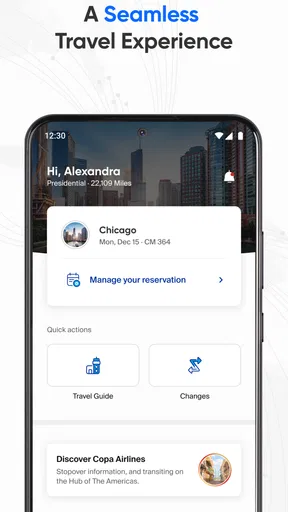
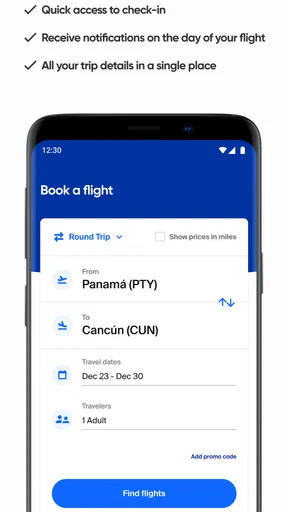
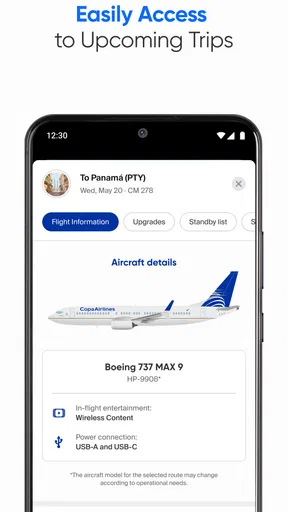
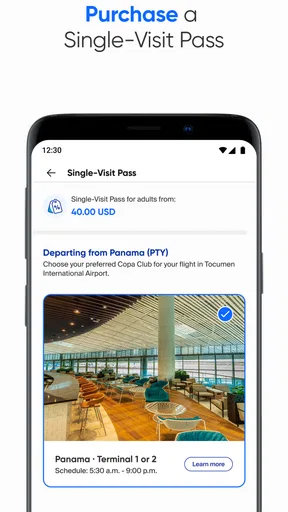
 Analysis by AppCompare
I approached Copa Airlines as more than a flight-booking shortcut. Travel apps handle moments when people are tired, rushed, carrying personal details, and trying to make decisions with little room for error. That makes trust just as important as convenience. In my experience, this app works best when I use it as a focused companion for a Copa journey rather than as a complete replacement for every travel tool on my phone.
The app comes from Copa Airlines and belongs to the Travel & Local category. It is free to use, carries an Everyone age rating, and has reached over a million installs. Those figures suggest that it has become a familiar option for passengers who prefer managing airline tasks from a phone, although its average rating of 3.8 shows that the experience is useful without being universally smooth.
What the app feels like in a real travel routine
The first thing I noticed is that the app has a clear purpose: it keeps Copa-related travel information close at hand. That sounds simple, but it matters when I am moving through an airport and do not want to switch between a browser, email, and several unrelated travel services. The app’s role is most convincing before departure, during the airport journey, and when I need to check the details of a trip I have already arranged.
A realistic example is a morning flight. I can use the app while preparing at home, check the itinerary, keep the relevant travel details available, and return to the same place while heading to the airport. If plans become stressful, having an airline-specific app can feel more direct than searching through an inbox for a confirmation message. The benefit is not that it magically removes travel problems; it is that it puts the airline relationship in one familiar location.
I would not treat it as my only source of information. I still keep important booking details accessible elsewhere, especially when travelling internationally or when a connection matters. Airline apps are helpful interfaces, but an app should not become the sole backup for a journey where a dead battery, poor signal, or sign-in problem could create unnecessary pressure.
The current version is 17.2.16, and the app requires operating system version 10 or later. That requirement is reasonable for people using a relatively current phone, but it is worth checking before planning to depend on the app during a trip. If your device cannot run it, the mobile website and your booking messages become more important alternatives.
Where it earns its place beside ordinary travel tools
Compared with a general travel app, the Copa Airlines app has one obvious advantage: it is centred on the airline rather than trying to combine every carrier, hotel, map, and booking service. That narrower focus can reduce clutter when my trip is specifically with Copa. I do not have to interpret a third-party interface that may present airline information alongside unrelated offers or accounts.
Worth Reading Before You Choose

EA SPORTS FC Mobile 26 Is a Bigger Football Game, but It Takes Time

Flipboard Shows What News Apps Must Do Beyond the Feed

Switching to Android Auto Means Rethinking Your Driving Routine

Google Calendar Makes a Crowded Week Easier to Manage

Ludo King Makes the Most of the Minutes Between Plans

Baby Panda World Brings Quick Play to Modern Phones, but Its Game Library Feels Busy
On the other hand, a general travel organiser can be better for a complicated itinerary involving several airlines, hotels, trains, and local transport. Those services are designed to create one broad trip timeline. Copa’s app makes more sense when the airline itself is the main part of the task. For a multi-provider journey, I would use both: the airline app for Copa-specific actions and a wider organiser for the complete picture.
An airline website remains a sensible alternative as well. A browser is useful on a computer, on a shared device, or when I do not want another app installed. The dedicated app is more convenient when I am already travelling with a phone in hand, but that convenience comes with the usual dependence on the device, its operating system, and the app session.
Trust starts with the choices I can actually see
My trust in a travel app is not based on polished screens or the fact that it comes from an airline. I look for visible control over the account and travel information I use. In this case, the practical test is whether I can understand what I am doing at each step: identifying a trip, entering passenger details, reviewing information, and deciding whether to continue.
I prefer to pause before submitting anything that changes a booking or adds personal information. That is especially important on a small screen, where a button can be easy to tap accidentally and where long forms are harder to review. My advice is to slow down at confirmation screens, read names and dates carefully, and avoid entering information while distracted in a boarding queue.
The app is more trustworthy when it acts as a clear window into my Copa travel rather than pushing me into decisions I do not understand. I pay attention to whether a screen explains the purpose of a request, whether an account action is obvious, and whether I can back out before finalising something. Those are small details, but they determine whether I feel in control.
I also avoid treating convenience as permission to share more than necessary. If a feature asks for information, I consider whether it is directly related to the flight task I am trying to complete. That habit is useful with any airline service, particularly when I am handling another passenger’s details or using a phone that someone else may borrow.
Account control matters more than a quick download
Signing into a travel service can save time, but it also concentrates itinerary information in one account. I recommend using an email address and password arrangement that you can manage confidently, rather than creating an account in a rush at the airport. If your phone is shared, unlocked, or frequently handed to other people, think about what could be visible after you finish using the app.
Before a trip, I would check that the account details and passenger names are correct while there is still time to fix a mistake. A common source of anxiety is discovering an error only after arriving at the airport. Reviewing information early is a better use of the app than waiting until the last possible moment.
I also keep a separate record of the booking reference and essential itinerary information. That is not a criticism of this particular app; it is a sensible travel practice. An airline app can make access easier, but it should not be confused with an independent backup. A screenshot, saved message, or written note may be useful if the phone loses power or connectivity.
When I finish a task, I do not leave the app open on a screen containing passenger or itinerary details. This is a simple user-controlled step that improves privacy on a practical level. It is especially worthwhile when travelling with family, colleagues, or children who may use the same device.
Personal information appears at the most sensitive moments
Travel naturally involves sensitive moments: booking, checking passenger details, managing an itinerary, and dealing with changes. I am more careful with the app during those moments than when simply browsing. I check the destination, travel date, passenger name, and any other visible information before confirming an action.
Airport conditions make this harder. People are often standing in bright light, moving through crowded spaces, or using public Wi-Fi. My practical approach is to complete important account work before reaching the busiest part of the airport whenever possible. If I must use the app there, I keep the screen private, avoid discussing personal details aloud, and make sure I am interacting with the official airline application rather than a copied or misleading page.
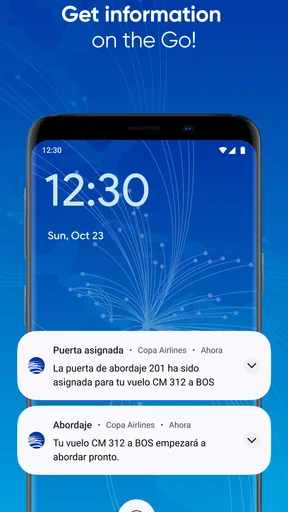
I also think about notifications. A travel alert can be useful, but a message displayed on a lock screen may reveal a destination or booking detail to anyone nearby. I review notification visibility in my phone’s settings and choose a level that suits my situation. That is a device-level choice, but it is part of using an airline app responsibly.
Another overlooked issue is shared travel planning. If I am organising a trip for relatives or colleagues, I do not assume that everyone wants their information displayed on my phone. I confirm what I need, limit casual sharing of screenshots, and remove old images when they are no longer useful. The app can support the workflow, but the user still controls how widely the information travels.
What I would check before relying on it
My preparation routine is deliberately cautious. I install and open the app before travel day, make sure the device meets the operating-system requirement, and sign in while I have stable internet access. I then review the itinerary and confirm that I know how to reach the relevant account or booking screen without experimenting in the departure hall.
I also test my backup plan. That means keeping the booking information available outside the app and carrying a charged phone. If I am travelling across borders or making a connection, I do not assume that mobile data will work perfectly everywhere. An app that is excellent at home may be less useful if I cannot load the information when I need it.
When the app presents a choice involving personal information, I read the wording instead of tapping through automatically. I look for the purpose of the request and decide whether it is necessary for the action I want. I do not infer privacy protections from the app’s airline branding, and I would encourage other travellers to rely on the controls they can actually see rather than on assumptions.
For families, I would set up the trip carefully and review every passenger detail before departure. For business travel, I would be equally careful about which account is being used, particularly if a company or travel coordinator arranged the booking. The right account can make the app convenient; the wrong one can create confusion at exactly the wrong time.
Where the experience may frustrate you
The rating of 3.8 across roughly 9,000 ratings gives me a balanced impression. Many travellers clearly find value in having Copa information on their phones, but the score also warns me not to expect a flawless experience in every situation. Airline apps are judged during stressful events, so even a small login, loading, or navigation problem can feel much bigger than it would in an ordinary shopping app.
My main reservation is dependence. If the app is slow, unavailable, or difficult to navigate when I am already under pressure, its convenience can quickly turn into friction. That is why I would not wait until the airport to discover how it works. A few minutes of preparation can reveal whether the account is ready and whether I have a usable backup.
The focused design can also feel limited for travellers who want one place for an entire holiday. If I need hotel reservations, rail tickets, restaurant plans, maps, and several airlines, I would not expect this app to replace a broader travel organiser. Its strength is the Copa portion of the journey, not the complete travel ecosystem.
People who rarely fly with Copa may also gain little from installing it permanently. A browser can be enough for an occasional booking, especially if storage is limited or the phone is older. The app becomes more worthwhile when I have an active Copa itinerary and expect to check or manage it repeatedly.
Who should use it, and who should choose another route
I would recommend the app to regular Copa passengers, travellers who prefer airline-specific control, and anyone who wants a dedicated place for a current Copa journey. It is also a practical choice for people who dislike searching through email while walking through an airport. The free price removes the cost barrier, so the decision mainly comes down to device compatibility, personal preference, and how often the airline is part of your travel plans.
I would be more cautious about recommending it as the only tool for a complex itinerary. If your trip combines multiple carriers or depends on a detailed day-by-day schedule, pair it with a general organiser. If you use an older device that cannot meet the operating-system requirement, use the airline’s browser-based route and keep independent copies of essential information.
I would also skip the app if you are uncomfortable maintaining another travel account or if you do not want itinerary information stored on your phone. In that case, a computer and carefully saved booking messages may suit you better. The app is not automatically the best option simply because it is official; it is best when its convenience matches the way you travel.
My cautious verdict after using it as a travel companion
Copa Airlines succeeds when I use it for what it is: a focused mobile companion for a Copa trip. Its official connection to Copa Airlines, free access, broad availability on supported devices, and airline-specific purpose make it more useful than a generic travel app for checking my Copa journey. The fact that it has passed a million installs also shows that it is not an obscure experiment.
Still, I would keep my expectations practical. The average rating is not a guarantee of a smooth experience, and an airline app should never be my only backup during an important journey. I prepare the account early, review every passenger detail, control what appears on my phone, and keep essential booking information somewhere else.
My final recommendation is therefore conditional but positive: install it when you have a Copa itinerary and want direct access to the airline’s travel workflow, especially before and during airport travel. Use a broader organiser for multi-provider trips, and use a browser or another method if your device is unsupported or you prefer not to manage another account. With those boundaries in mind, Copa Airlines is a useful free app, provided you remain the one making the decisions about access, information, and backups.
Pros
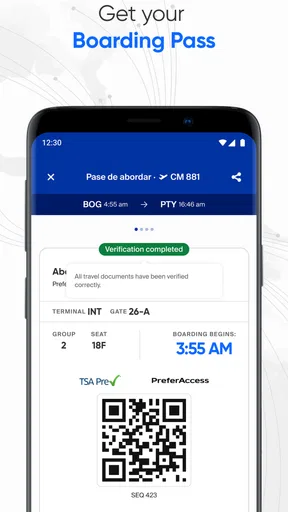
- Convenient mobile check-in and digital boarding pass access
- Flight status updates help travelers monitor delays and gate changes
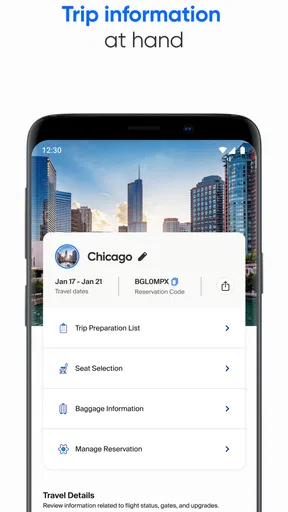
- Manage bookings
- select seats
- and add services from the app
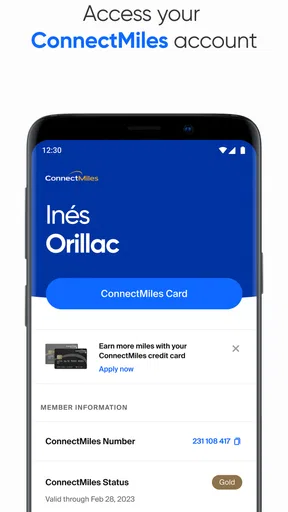
- ConnectMiles integration makes it easy to track rewards and benefits
- Useful travel information is available before and during the journey
Cons
- Some features may require a stable internet connection to load properly
- App performance can vary depending on device and operating system
- Customer support options may not resolve complex issues immediately
- Ancillary fees and seat options are not always easy to compare
- Occasional login or account synchronization issues may affect users
FAQs for Copa Airlines
What is the Copa Airlines app used for?
The Copa Airlines app is designed to manage most parts of a trip from a mobile device. After signing in, you can search and book flights, review itineraries, check flight status, complete online check-in when available, access your boarding pass, and manage certain reservations. It is especially useful for travelers flying with Copa Airlines or connecting through its Panama hub.
Can I book and manage Copa Airlines flights through the app?
Yes. The app generally allows users to search for available Copa Airlines flights, compare schedules and fares, make a reservation, and review booking details. Depending on the itinerary and ticket conditions, you may also be able to select seats, add services, update passenger information, or manage changes. Some requests may still require contacting Copa support directly.
Can I check in and use a mobile boarding pass with Copa Airlines?
In many cases, passengers can check in through the Copa Airlines app during the airline’s permitted check-in window and receive a digital boarding pass. Availability can depend on the departure airport, destination, travel documents, passenger information, and itinerary. It is wise to verify the airport requirements in advance, since some locations may require a printed document or additional verification.
Does the Copa Airlines app show flight status and travel updates?
The app can be useful for monitoring flight information, including scheduled departure and arrival times, gate details when available, and possible operational updates. Notifications may help you follow changes to your itinerary, but they should not be your only source of information. Always check the airport displays and listen for announcements, particularly during delays, connections, or irregular operations.
Is the Copa Airlines app free, and do I need an account to use it?
Downloading the Copa Airlines app is generally free, although normal mobile data or internet charges may apply. Some basic functions, such as searching for flights or checking certain flight information, may be available without signing in. Creating or using a Copa account can make it easier to retrieve reservations, manage your ConnectMiles information, receive personalized updates, and speed up future bookings.


